> For the complete documentation index, see [llms.txt](https://docs.arnica.io/arnica-documentation/llms.txt). Markdown versions of documentation pages are available by appending `.md` to page URLs; this page is available as [Markdown](https://docs.arnica.io/arnica-documentation/inventory/repositories.md).

# Repositories

The [Repositories](https://app.arnica.io/#/inventory/repos-v2) page gives a full cross-SCM view of every repository connected to Arnica, in a single unified table sorted by Business Importance by default.

<figure><img src="/files/ZFxJ2FD9nun361GIoHEf" alt=""><figcaption><p>Repositories table showing Business Importance, SCM type, Vibe Coding Rules, MCP, and Agent Skills</p></figcaption></figure>

## Table Columns

All 21 columns are optional - none are mandatory. Use the **column picker** (table settings icon in the toolbar) to show or hide any column and set rows per page. Preferences are saved between sessions.

<table><thead><tr><th>Column</th><th width="95">Default</th><th width="95">Sortable</th><th>Filter</th></tr></thead><tbody><tr><td><strong>Importance</strong></td><td>✓</td><td>✓</td><td>Multi-select</td></tr><tr><td><strong>SCM</strong></td><td>✓</td><td>✓</td><td>Multi-select</td></tr><tr><td><strong>Organization</strong></td><td>✓</td><td>✓</td><td>Multi-select</td></tr><tr><td><strong>Repository</strong></td><td>✓</td><td>✓</td><td>Multi-select</td></tr><tr><td><strong>Default Branch</strong></td><td>✓</td><td></td><td></td></tr><tr><td><strong>Last Activity</strong></td><td>✓</td><td>✓</td><td>Date range (7 / 30 / 90 days)</td></tr><tr><td><strong>Topics</strong></td><td>✓</td><td></td><td>Multi-select</td></tr><tr><td><strong>Visibility</strong></td><td>✓</td><td>✓</td><td>Multi-select</td></tr><tr><td><strong>Vibe Coding Rules</strong></td><td>✓</td><td></td><td>Multi-select</td></tr><tr><td><strong>Vibe Coding Annotations</strong></td><td>✓</td><td></td><td></td></tr><tr><td><strong>Has MCP</strong></td><td>✓</td><td>✓</td><td>Boolean</td></tr><tr><td><strong>Agent Skills</strong></td><td>✓</td><td></td><td>Multi-select</td></tr><tr><td><strong>Organization ID</strong></td><td></td><td>✓</td><td>Multi-select</td></tr><tr><td><strong>Project</strong></td><td></td><td>✓</td><td>Multi-select</td></tr><tr><td><strong>Top Important Branches</strong></td><td></td><td></td><td></td></tr><tr><td><strong>Minimum Required Approvals</strong></td><td></td><td></td><td>Boolean</td></tr><tr><td><strong>Requires Pull Request</strong></td><td></td><td></td><td>Boolean</td></tr><tr><td><strong>Require Code Owner Review</strong></td><td></td><td></td><td>Boolean</td></tr><tr><td><strong>Prohibit Force Push</strong></td><td></td><td></td><td>Boolean</td></tr><tr><td><strong>Require Arnica Status Check</strong></td><td></td><td></td><td>Boolean</td></tr><tr><td><strong>Required Status Checks</strong></td><td></td><td></td><td>Boolean</td></tr></tbody></table>

## Search, Filters & Export

**Search** - Free-text search across all visible fields. Prefix a term with `-` to exclude it (e.g. `-archived`).

**Column filters** - click the filter icon on any column header. Filter types are shown in the table above. Multi-select filters display match counts and support text search within the options.

Clicking an Insights card on the [Git Summary](/arnica-documentation/inventory/git-summary.md) page opens the table with the relevant filter pre-applied.

**Toolbar controls:**

* **Reset filters** - clears all active filters in one click
* **Reload** - refreshes the table
* **Export to CSV** - exports up to 50,000 rows. Exports selected rows if any are checked, otherwise the full filtered result set. File is named `Repositories [timestamp].csv`.

## Business Importance

Every repository is assigned a **Business Importance** level: **High**, **Medium**, or **Low**. This is the default sort order - your most critical repositories always appear at the top.

Importance is computed automatically from a combination of factors including contributor count, pull request activity, presence of IaC and CI/CD files, branch protection configuration, and detected AI coding tool usage. You can override it per repository directly from the Overview tab in the detail panel.

{% hint style="info" %}
Business Importance feeds into [Products](/arnica-documentation/inventory/products.md) - repositories assigned to a product inherit its priority context for risk triage.
{% endhint %}

## AI Coding Presence

Arnica detects AI coding tool configuration files committed to each repository and displays them as icons in the **Vibe Coding Rules** column. Supported tools include Cursor, GitHub Copilot, Windsurf, Augment Code, Claude Code, Gemini Code Assist, and Coding Agents.

The table also shows **Has MCP** (Model Context Protocol server configurations detected) and **Agent Skills** (SKILL.md files detected) as separate columns.

## Repository Details

Clicking any row opens a detail panel at the bottom of the page. Use the resize handle to adjust the split, or expand to full screen.

### Overview

Shows the repository's key metadata: organization, project, SCM link, fork status, visibility, default branch, and Business Importance (editable via dropdown). The **Code Risk Trends** section displays open risks by severity and by status over time, with a direct link to the full Code Risks view.

<figure><img src="/files/YyvOBSKZkK05lr6GFWoi" alt=""><figcaption><p>Repository detail - Overview tab showing metadata and Code Risk Trends</p></figcaption></figure>

### Contributors

Shows the top 10 code authors and top 10 code reviewers for the repository over the last 90 days, by commit and review count respectively. Contributors who are no longer members of the organization are flagged inline.

<figure><img src="/files/P2Sjht6Ko20fwcbBZa7y" alt=""><figcaption><p>Contributors tab showing top code authors and reviewers over the last 90 days</p></figcaption></figure>

### Top Important Branches

Shows the protection status for the repository's SLA branches - the branches configured in Arnica as important for your organization. Each row is a branch; each column is a protection setting - a checkmark means it's enabled, an X means it's not.

<figure><img src="/files/MIrGCnumnQWGF4KK1X5G" alt=""><figcaption><p>Top Important Branches tab showing the branch protection status per branch</p></figcaption></figure>

| Setting                         | What it enforces                                  |
| ------------------------------- | ------------------------------------------------- |
| **No Force Push**               | Prevents overwriting branch history               |
| **Restrict Pushes**             | Limits who can push directly to the branch        |
| **Require Pull Request**        | All changes must go through a PR                  |
| **No Self Approval**            | PR authors cannot approve their own changes       |
| **Min Required Approvals**      | Minimum number of reviewer approvals before merge |
| **Require Code Owner Review**   | Code owners must approve changes to their files   |
| **Require Signatures**          | Commits must be GPG-signed                        |
| **Enforced on Admins**          | Protection rules apply to administrators too      |
| **Require Arnica Status Check** | Arnica's security check must pass before merge    |
| **Required Status Checks**      | Other CI/CD checks must pass before merge         |
| **Prohibit Delete Branch**      | Prevents the branch from being deleted            |

{% hint style="info" %}
Repositories with missing branch protections surface as **Unprotected Repos** on the [Git Summary](/arnica-documentation/inventory/git-summary.md) page.
{% endhint %}

### Applications

Lists the applications detected on the repository's default branch via SBOM analysis. Use the SBOM link in the tab to view the full software bill of materials, including other branches.

<figure><img src="/files/glzXYf5kivOZ8BwiNQZm" alt=""><figcaption><p>Applications tab showing SBOM-detected applications on the default branch</p></figcaption></figure>

### Container Images

Shows container images linked to this repository. Requires a container registry integration. See [Container Images](/arnica-documentation/inventory/container-images.md).

<figure><img src="/files/oIVTc0jJ6hA6AeI0CNGb" alt=""><figcaption><p>Container Images tab showing images linked to this repository</p></figcaption></figure>

### Vibe Coding Rules

Lists every AI coding tool configuration file detected in the repository. Each entry shows the tool type, filename, and path with a direct link to the file in the SCM.

<figure><img src="/files/qa6GAE8Ty5HLqlo2iP3s" alt=""><figcaption><p>Vibe Coding Rules tab listing detected AI coding tool configuration files</p></figcaption></figure>

### Vibe Coding Annotations

Annotations are citations left as code comments by AI coding agents when they follow an Arnica security rule and prevent a risk from being introduced to the code. For example:

```
// Agentic Rule (ARNIE_AUTH_PASSWORD_HASHING): Using bcrypt with 12 rounds for secure password hashing
```

Arnica scans the repository's configured SLA branches and surfaces every citation it finds. Each entry shows the Rule ID, file path with SCM link, author, commit date, and commit hash. Entries are grouped by Rule ID.

{% hint style="info" %}
Annotations are produced by the Agentic Rule Enforcer - a policy action that injects your AI Coding Rules into repository configuration files on every PR. See [Agentic Rule Enforcer](https://github.com/arnica-internal/docs/blob/main/developers/agentic-rule-enforcer.md).
{% endhint %}

<figure><img src="/files/oTnxheeyBuBfqjh7fSDl" alt=""><figcaption><p>Vibe Coding Annotations tab listing Agentic Rule citations committed by AI coding agents</p></figcaption></figure>

### MCP Servers

Lists Model Context Protocol server configuration files detected in the repository. Each entry shows the tool type, filename, path with a direct link to the file in the SCM, and the list of server names configured.

Arnica detects MCP configs for the following clients:

| Client             | Config file path                         |
| ------------------ | ---------------------------------------- |
| Cursor             | `.cursor/mcp.json`                       |
| Cursor             | `.cursor/mcp_config.json`                |
| VS Code            | `.vscode/mcp.json`                       |
| VS Code            | `.vscode/settings.json` (with MCP block) |
| JetBrains / Junie  | `.junie/mcp/mcp.json`                    |
| JetBrains / Junie  | `.junie/mcp/mcp_config.json`             |
| Windsurf (Codeium) | `.codeium/windsurf/mcp_config.json`      |
| Generic            | `.mcp.json` (repo root)                  |
| Generic            | `mcp_config.json` (repo root)            |

<figure><img src="/files/7boRKajOozjewri1TcJB" alt=""><figcaption><p>MCP Servers tab listing Model Context Protocol server configurations detected in the repository</p></figcaption></figure>

### Agent Skills

Lists SKILL.md files detected in the repository. Each entry shows the tool type, skill name, and path with an SCM link. Click an entry to view the full skill description rendered as Markdown.

Arnica detects SKILL.md files for the following clients:

<table><thead><tr><th width="200">Client</th><th>Config file path</th><th width="140">Notes</th></tr></thead><tbody><tr><td>Cursor</td><td><code>.cursor/skills/&#x3C;name>/SKILL.md</code></td><td></td></tr><tr><td>Claude Code</td><td><code>.claude/skills/&#x3C;name>/SKILL.md</code></td><td></td></tr><tr><td>GitHub Copilot</td><td><code>.github/skills/&#x3C;name>/SKILL.md</code></td><td></td></tr><tr><td>Agents Framework</td><td><code>.agents/skills/&#x3C;name>/SKILL.md</code></td><td></td></tr><tr><td>OpenCode</td><td><code>.opencode/skills/&#x3C;name>/SKILL.md</code></td><td></td></tr><tr><td>Gemini CLI</td><td><code>.gemini/skills/&#x3C;name>/SKILL.md</code></td><td></td></tr><tr><td>Google Antigravity</td><td><code>.agent/skills/&#x3C;name>/SKILL.md</code></td><td>Legacy</td></tr><tr><td>Windsurf</td><td><code>.windsurf/skills/&#x3C;name>/SKILL.md</code></td><td></td></tr><tr><td>Continue.dev</td><td><code>.continue/skills/&#x3C;name>/SKILL.md</code></td><td></td></tr><tr><td>Roo Code</td><td><code>.roo/skills/&#x3C;name>/SKILL.md</code></td><td></td></tr><tr><td>Cline</td><td><code>.cline/skills/&#x3C;name>/SKILL.md</code></td><td></td></tr><tr><td>Cline</td><td><code>.clinerules/skills/&#x3C;name>/SKILL.md</code></td><td></td></tr><tr><td>JetBrains / Junie</td><td><code>.junie/skills/&#x3C;name>/SKILL.md</code></td><td></td></tr><tr><td>Goose</td><td><code>.goose/skills/&#x3C;name>/SKILL.md</code></td><td></td></tr><tr><td>OpenClaw</td><td><code>skills/&#x3C;name>/SKILL.md</code></td><td>Repo root only</td></tr><tr><td>Unknown / Custom</td><td>Any other SKILL.md path</td><td>Fallback detector</td></tr></tbody></table>

SKILL.md files must include a YAML frontmatter block. Files without valid frontmatter are silently excluded from results - they will not appear in Arnica even if the path is correct.

{% hint style="warning" %}
The `description` field is required. A SKILL.md with no frontmatter, or with frontmatter that is missing `description`, will be silently ignored by Arnica - no error is shown.
{% endhint %}

The minimum valid format is:

```yaml
---
name: "My Skill"
description: "What this skill does - required, up to 500 characters."
---
```

<table><thead><tr><th>Field</th><th width="100">Required</th><th width="120">Max length</th><th width="320">Notes</th></tr></thead><tbody><tr><td><code>name</code></td><td>No</td><td>64 chars</td><td>Defaults to parent directory name if omitted</td></tr><tr><td><code>description</code></td><td>Yes</td><td>500 chars</td><td>File is excluded if missing or empty</td></tr></tbody></table>

<figure><img src="/files/6SmVv7gmznSQ7EPcHeuz" alt=""><figcaption><p>Agent Skills tab listing SKILL.md files detected in the repository</p></figcaption></figure>

### Technologies

Shows a language and framework breakdown for the repository based on code analysis, alongside the Business Importance factors breakdown (see [Business Importance](#business-importance) for the full list of factors).

<figure><img src="/files/VwMdSATRM7o7UvVGBSTj" alt=""><figcaption><p>Technologies tab showing language and framework breakdown</p></figcaption></figure>

### Settings

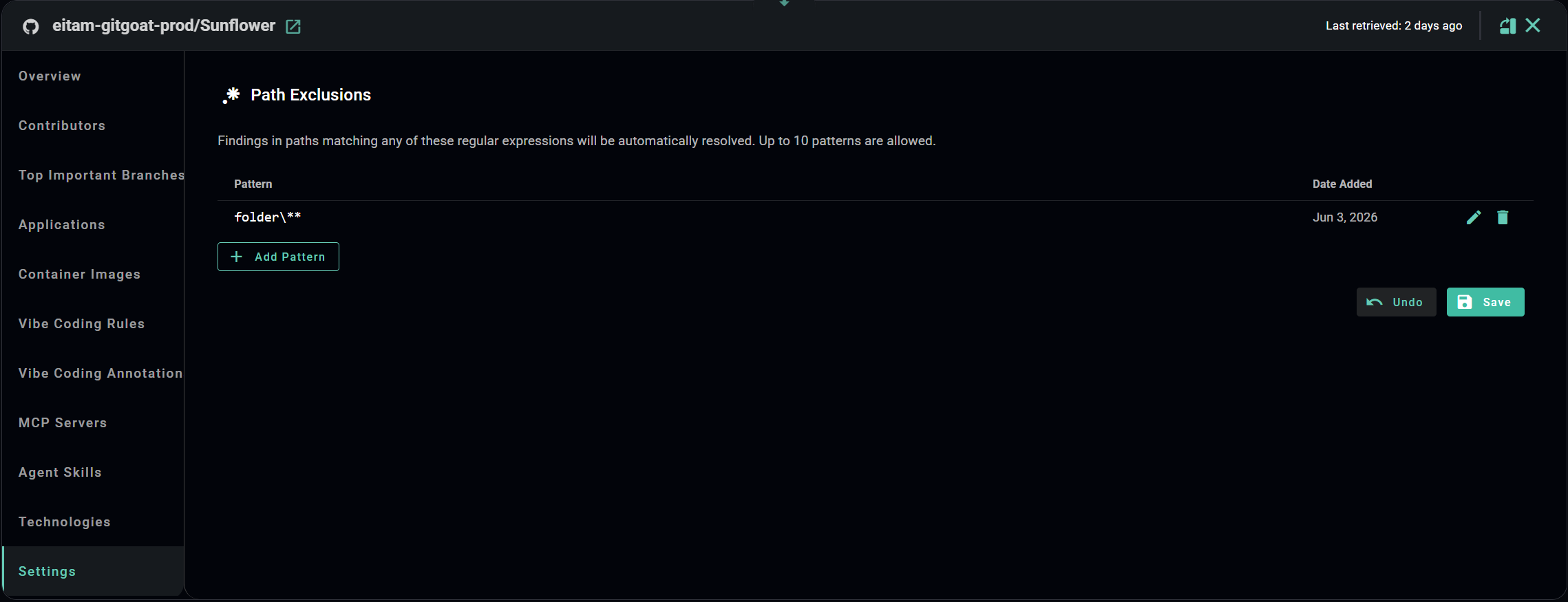
The Settings tab contains **Path Exclusions** - regular expression patterns (JavaScript/PostgreSQL regex; glob syntax is not supported; patterns that could cause catastrophic backtracking are rejected) that automatically resolve findings whose file path matches.

<figure><img src="/files/NKBvwClB7wXwVnCcGcb4" alt=""><figcaption><p>Settings tab showing a saved path exclusion pattern</p></figcaption></figure>

#### Adding a pattern

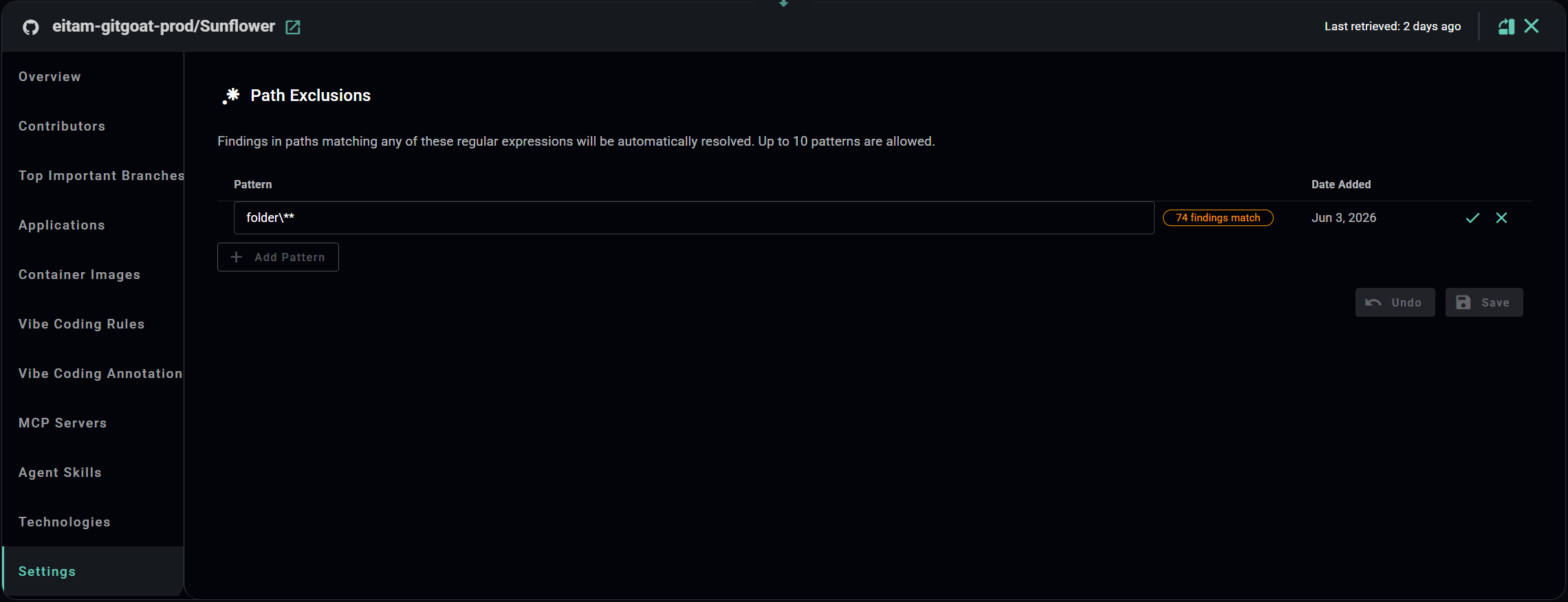
Click **+ Add Pattern** and enter a regular expression. While editing, Arnica shows a live count of open findings that currently match the pattern - useful for understanding the impact before saving.

Note: Each repository supports up to **10** patterns.

<figure><img src="/files/vv7CwrfQ1F9VeJf4j9zz" alt=""><figcaption><p>Live preview showing the number of open findings matching the pattern</p></figcaption></figure>

Click the **checkmark** to confirm the pattern, then **Save**. Two things happen immediately on save:

1. All existing open findings (status: New or In Progress) whose path matches are automatically resolved. Each affected finding records: *"Finding closed due to the following path exclusion: \<pattern>"* in its timeline.
2. A full rescan is triggered across all scanner types - so future scans will never generate new findings for excluded paths.

<figure><img src="/files/knFUX8kI1z6Hgn35aVDB" alt=""><figcaption><p>Confirmation after saving - matching findings are auto-resolved immediately</p></figcaption></figure>

{% hint style="info" %}
Path exclusions affect all finding types - any finding whose file path matches the pattern is resolved, regardless of scanner type.
{% endhint %}

{% hint style="warning" %}
Deleting a pattern does not automatically reopen previously resolved findings. A rescan is triggered, so findings will reappear only if the underlying issue still exists in the code.

Managing path exclusions requires the **Security Reviewer** role or above.
{% endhint %}